Modem Control
>>> Tools: Modem Control...
>>> Ctrl+M
The Modem Control function is used to establish contact with a logger via modems and the telephone network.
Selecting Modem Control displays the Modem Control Dialog Box
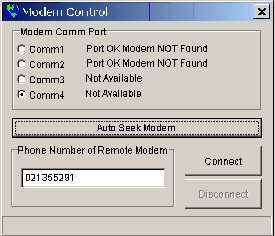
To connect to a logger via modem:
- Select the Comm Port for your computer Modem
OR
- Click on the Auto Seek Modem Button and OmniLog will check all your Comm Ports for a modem
- Enter the phone number of the modem connected to the remote logger
- Click on the Connect button to establish contact with the remote logger
- Progress of the connection process will be displayed on the status bar of the Modem Control Dialog Box.
- Once a connection has been established, all Omnilog features including Realtime display will be available for the remote logger.
- When the modem connection is no longer required you can disconnect from the remote logger by Clicking on the Disconnect button
Modem Link Overview


