


|
|
|
|
|
The loggers can use modem links both for general communications with a computer and to dial a pocket pager when alarm conditions occur. A special modem cable is required between the logger and the modem. The connection required for general communication is identical to that required to dial a pocket pager.
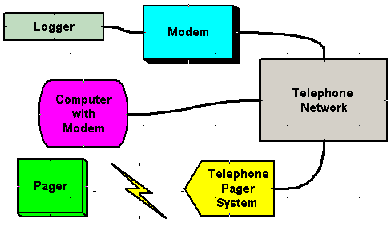
The logger is connected to a modem with a "logger to modem" cable (this is a different cable to the Download Cable). The modem is connect to the telephone network. The logger can now be controlled by any computer with a modem that is connected to the telephone network. The logger can also be configured to send a message to a pocket pager on the telephone network if user specified alarm conditions occur.
The dataloggers communicate at 19200 baud. Most Hayes Compatable Modems that can lock the logger to modem (DTE) baud rate to 19200 can be used with these loggers. Some modems will try to autoseek the incomming baud rate from the logger. This type of modem cannot be used with these loggers.
Using the Modem Control Screen to connect to a remote logger/modem
Setting up Modems for General Communications and Pager Alarms