


|
|
|
|
|
>>> View: Statistics View
>>> Alt+S
>>> 
The Statistics View function displays a View of the Active Dataset (the Dataset displayed in the Dataset Selector on the Toolbar) with the data shown in Statistics mode. Limits can be set up for each value to be logged in Tools Options... Limits
The following Statistics are provided for each channel in the Dataset
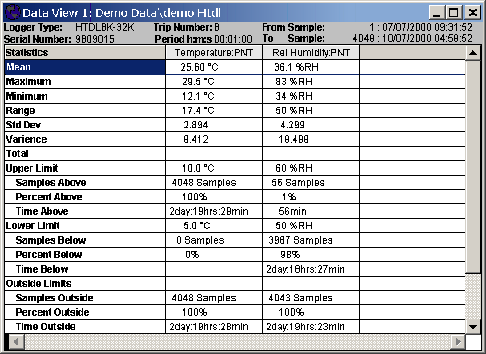
A number of functions are available in this mode. These are selected from a popup menu that is displayed on a right mouse click with in the Values display. These functions include:
Values View |
Sets the Dataset View to Values only. |
Statistics View |
Sets the Dataset View to Statistics mode only. Any blocks set in the previous values mode will be reflected in the new Statistics View |
Graph View |
Sets the Dataset View to Graph mode only. Any blocks set in the previous values mode will be reflected in the new Graph View |
Values and Statistics |
Sets the Dataset View to a combination of both Values and Statistics modes |
Graph and Values |
Sets the Dataset View to a combination of both Graph and Values modes |
Graph and Statistics |
Sets the Dataset View to a combination of both Graph and Statistics modes |
If a block has been selected, the Statistics View will show statistics for that block. The Statistics View will be displayed with a dark green background indicating that a block has been set and that the statistics shown are for that block only.
There are two ways of defining a block.