Rotary Distance Calibration
- Enter the required Units in the box marked Units
This will normally be mm for millimeters or in for inches - Set the arm so that it is in the start position or 0 distance
- Click on the First Point Button
- Set the arm so that it is at 90° to the start point
- Enter the Linear Distance that the arm has swung through into the Box marked Second Point. This will be the same as the length of the arm.
- Click on the Second Point Button
- Notice that new calibration offset and gain figures have been calculated and the distance you entered is now in the Scale Gain Box.
- Click on the Write Unit, Scaling and Calibration values to the Logger button to send the new settings to the logger.
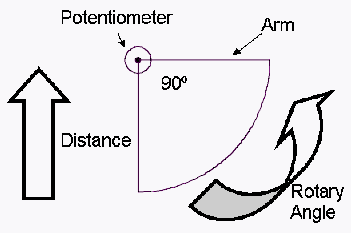
Example
Calibration for a 1000mm Water Height system with arm and float
- Enter mm the required Units in the box marked Units
- Set the arm so that it is in the start or 0mm position (float is hanging vertically)
- Click on the First Point Button
- Raise the arm up to the 90° horizontal position
- Enter the 1000 into the Box marked Second Point.
- Click on the Second Point Button
- Notice that new calibration offset and gain figures have been calculated and 1000 is now in the Scale Gain Box.
- Click on the Write Unit, Scaling and Calibration values to the Logger button to send the new settings to the logger.


