Soil Water Tension Calibration
The soil moisture tension probe has an internal pressure sensor. This should be calibrated with the logger channel set to pressure mode. This process is described below. Once the pressure sensor is calibrated, the logger channel can be set to Soil Moisture Tension. As the amount of water that can be stored in the soil matrix varies with soil type, the channel can be set for five different soil types, Loamy Sand, Fine Sandy Loam, Sandy Loam, Loam and Clay.
The calibration process is as follows:
- Attach the Soil Tension probe to the logger
- Remove the Ceramic Cup
- Set the logger channel to Pressure
- Place the Pressure Probe into a known low pressure (600 to 800 HPa)
- Enter the known pressure value into the First Point Actual Value box
- Click on the First Point button
- Place the Pressure Probe in a known higher pressure (Atmospheric Air Pressure if known)
- Enter the second known pressure value into the Second Point Actual Value box
- Click on the Second Point button
- Click on the Write Unit, Scaling and Calibration Values to logger button
- The Pressure Calibration process is now complete
- Now select Soil Moisture for the required soil type
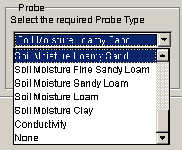
- Click on the Write Unit, Scaling and Calibration Values to logger button
- The Soil Moisture Calibration process is now complete
- Don't forget to replace the Ceramic Cup.


