


|
|
|
|
|
>>> View: Logger Control [Alarm Conditions]
>>> Ctrl L [Alarm Conditions]
>>>  [Alarm Conditions]
This tab allows the user to setup the required alarm conditions and what will happen when that alarm condition is detected by the logger. Older loggers may not have any alarms available.
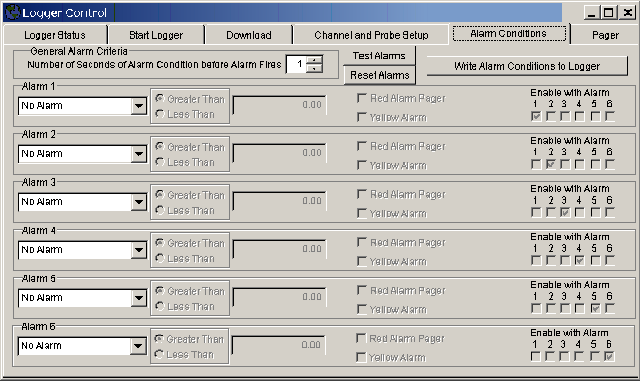
General Alarm Criteria
This sets up the general alarm properties

Number of seconds of Alarm before alarm fires
This sets out the number of seconds an alarm is detected before the alarm is reported by the system. This must be continues seconds of alarm.
Test Alarms
Test Alarms is used to test the pocket pager alarm function. Clicking the button will cause the logger to dail the pager through a modem as if an alarn condition had occured.
Reset Alarms
Reset Alarms is used to send an alarm reset to the logger.
Write Alarm Conditions to Logger
Write Alarm Conditions to Logger is used to send new alarm conditions that have just been set up on the Alarm screen to the logger.
Alarm setup
There are 6 areas to allow the user to setup 6 alarm conditions.

Alarm probe
This area specifies which probe to use for this alarm. All probes that have been configurated for the currently connected logger will be available.
Alarm condition greater than or less than
Is the alarm to be set with a probe input that is greater than or less than the specified value
Reference value
Reference value used to check the probe against to decide an alarm condition exists
Pager Alarm
If ticked an alarm will dial a Pager if a modem is available.
External Alarm
If ticked an alarm will Activate an external line that can be used to activate a audible warning device.
Enable with alarm

This area specified which other alarm conditions must be active before this alarm condition will trigger an actual alarm. This allows more than one alarm condition to be set and only if all the conditions are meet will the alarm go off.
For examples of setting up alarms see Alarm System Overview