|
|
|
|
|
The Alarm system is not available on all loggers. Where available, the Alarm system is used to alert the user to critical changes in one or more conditions.
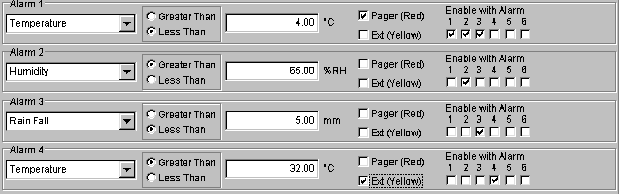
These conditions can be setup by the user in the Alarms section of the Logger Control window available from the View menu and the Logger Control Button on the Tool bar. When the alarm condition or conditions are met, the logger can alert the user either by dialing a Pager or triggering an External Alarm Output.
To use the Pager option, the logger must be connected to the telephone network via a modem. The Pager Alarm Modem String, Phone Number and Message Number are setup in the Pager tab of the Options function. The External Alarm Output is a logger output line that can be used to trigger a warning device such as a siren, bell or flashing light.
The Alarms section of the Logger Control Screen allows the user to configure up to six Alarm conditions. These six alarm conditions can be use individually or in groups to trigger either the Pager alarm, the External Alarm Output or both.
To configure an alarm condition the user must choose a probe to monitor and enter a reference value for that probe. The user must then specify if the alarm condition is triggered by the probe value being Greater Than or Less Than the reference value. The type of alarm that is triggered when the alarm condition is meet can then be setup. The options are NO alarms, Pager Only, External Alarm Output Only and Both Pager and External.
Alarm conditions can be grouped together using the “Enable with Alarm” function. This function enables an alarm condition ONLY IF another alarm condition has been meet. This allows the user to set up an alarm that will trigger if and only if two or more alarm conditions are meet.
Examples of Alarm Configurations
Pager alarm
IF Temperature is less than 4°C

External alarm
IF Temperature is less than 4°C
Or Humidity is greater than 65%

Pager alarm
IF Temperature is less than 4°C
OR
External alarm
IF Humidity is greater than 65%

Pager alarm
IF Temperature is less than 4°C
AND Humidity is greater than 65%

Pager alarm
IF Temperature is less than 4°C
AND Humidity is greater than 65%
AND Rainfall is less than 5mm
OR
External Alarm
IF Temperature is greater than 32°C