|
|
|
|
|
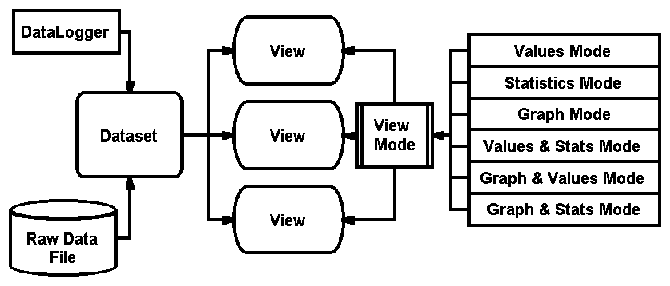
The OmniLog Data Management System uses data that is organized into Datasets. A Dataset is collection of information about:
Datasets can be created either by downloading data from a logger, by loading raw data from a previously saved log file or by joining existing datasets into a new derived dataset.
Once created, Datasets are available for selection in the Dataset Selector on the Tool Bar
When downloaded data is saved, it is saved in a raw data format (.log extension) that can be reloaded at a later date to create a new Dataset.
Datasets are displayed in Views. Each View of a Dataset can be displayed in a number of modes including Values, Statistics, Graph, Values & Statistics, Graph & Values and Graph & Statistics. Some of these views are available from the Main Toolbar, all views are available from the View Menu.
If require, the user can create a number of different views of the same Dataset. Each View of a Dataset is independent of all other Views. The view mode can be changed within each View. (eg if you right click on a Values View you can change it to any other mode)