


|
|
|
|
|
>>> Tools: Options... [Program]
The Program tab gives access to controls that set up the operation of the Omnilog software.
The Show Omnilog Assistant at Startup option is used to enable and disable the Omnilog Assistant. The Omnilog Assistant is a dialog box which can be used to automate initial connection and access help on commonly used procedures. When the software is first installed the Omnilog Assistant will automatically pop up every time the application is started. Even if the Omnilog Assistant has been disabled here it can still be accessed through the Help menu if required.
If the Show Logger Control Screen when a new logger connects option is selected the Logger Control Screen will automatically appear when a new logger connects. If this option is de-selected (no tick) the Logger Control Screen will not appear automatically and if required will need to be activated from the main Tool Bar.
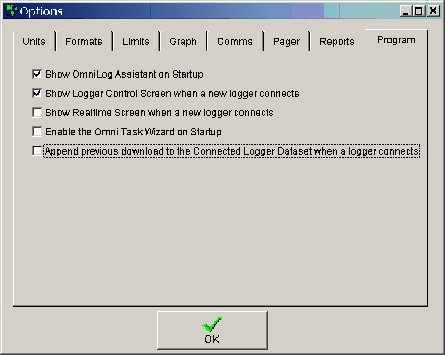
If the Show Realtime Screen when a new logger connects option is selected the Realtime Screen will automatically appear when a new logger connects. If this option is de-selected (no tick) the Realtime Screen will not appear automatically and if required will need to be activated from the main Tool Bar.
You cannot select both Show Logger Control Screen when a new logger connects and Show Realtime Screen when a new logger connects at the same time. Selecting one will de-select the other.
Enable the Omni Task Wizard. At present the Omni Task Wizard is in beta testing and this option will only work at the Beta Test Sites. If selected, the Enable the Omni Task Wizard option will activate the Omni Task Wizard when the program is started. This allows the Task Wizard tasks to be activated automatically when Omnilog starts. This option is used when the computer is running unattended. The Computer is setup to run Omnilog automatically on power up. If computer power fails and is restored the computer will start, run the Omnilog software and the Omni Task Wizard will be automatically activated. If the computer is attended, the Task Wizard can be activated from the Task Wizard window and the Enable the Omni Task Wizard should not be used.
If Append previous download to the Connected Logger Dataset when a logger connects is ticked:
If Append previous download to the Connected Logger Dataset when a logger connects is NOT ticked: