

|
|
|
GP-HR Rain Fall
Application Notes

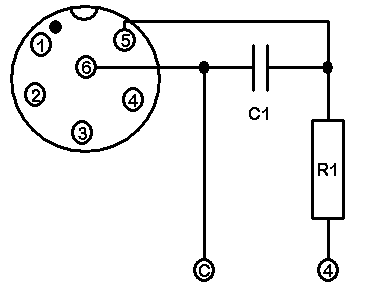
The Fast Pulse Digital input of the GP-HR Logger can be configured to read a tipping bucket rain gauge. A debounce capacitor and reset protection resistor are required for proper operation of the GP-HR Logger.
Tipping Bucket Rain Gauge Circuit
A debounce capacitor of 0.1uF is required across the logger input and a 1k ohm resister is required in the input line.We supply a Rain Fall Adapter and Rain Fall Adapter with Thermister Temperature Probe sets. These have the correct resisters and capacitors fitted inside the adapter socket.
Circuit for GP-HR with Tipping Bucket Rain Gauge input
R1 is 1K ohm and C1 is 0.1uF
Setting up a Rain Fall channel using the OmniLog Software
Connect the GP-HR logger to a computer and Run the OmniLog software
From the Logger Control Screen select Channel and Probe Setup
Select Channel 4 (This is the Fast Pulse Input Channel)
From the Probe box select the Rain Fall option as shown
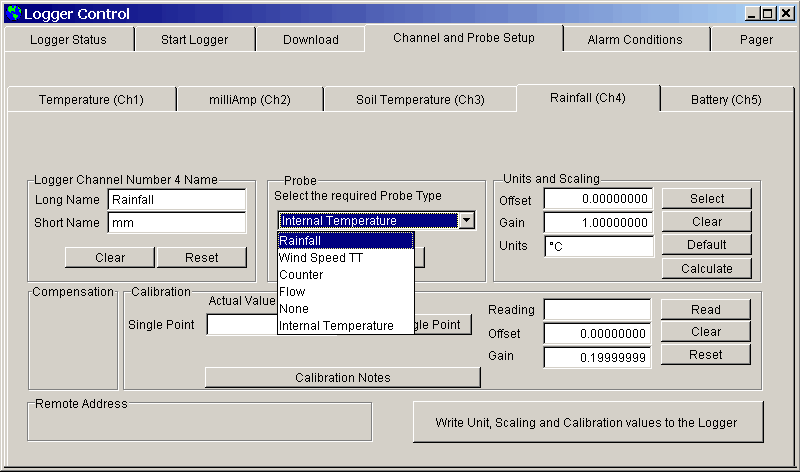
Notice that after the Rainfall probe has been chosen the Units in the Unit and Scaling box has been set to mm
Now give the Channel a meaningful Long and Short name in the Logger Channel Name box as shown below
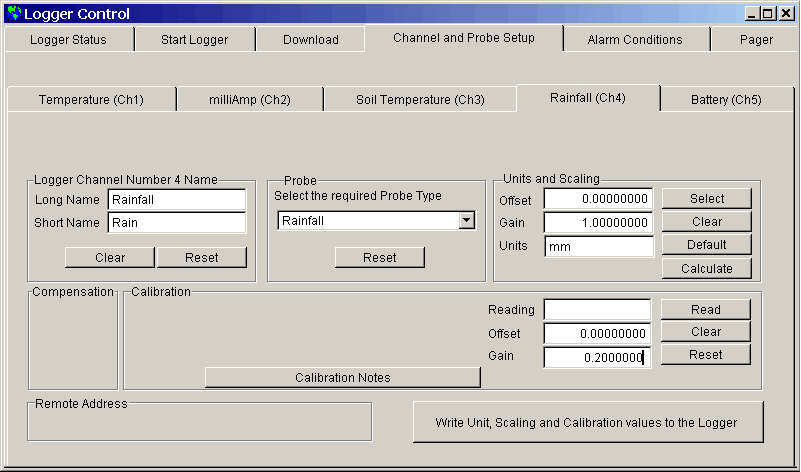
Click on the Write Unit, Scaling and Calibration values to the Logger button to send the new settings to the logger.
Click on the Calibration Notes button in the Calibration box to see the Tipping Bucket Rain Gauge Calibration procedure.