


|
|
|
|
|
>>> View: Logger Control [Logger Status]
>>> Ctrl L [Logger Status]
>>>  [Logger Status]
The Logger Status tab shows the configuration retrieved from the currently connected logger the last time its configuration area was downloaded. The Read Configuration button on this screen can be used to reread the configuration area from the logger and display the current status.
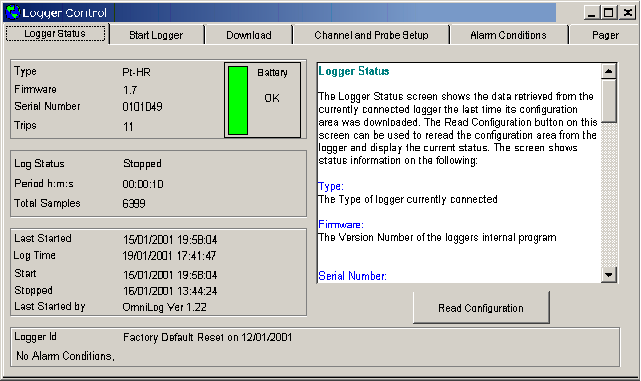
The Logger Status screen gives the following information:
Type
This displays the type of logger currently connected
Battery Status
The Battery Status indicator shows the current state of the loggers internal battery. It will indicate that the battery is OK (green) , Marginal (yellow) or requires Replacement (red).

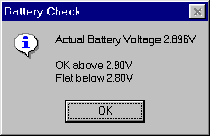
You can check the Actual Battery Voltage by clicking on the colored area of the Battery Status indicator. This will give you a Battery Check Window.
Firm ware
The Version Number of the loggers internal program
Serial Number
The Serial number of the logger. Each logger has a unique serial number
Trips
The number of times the logger has been started
Log Status
The current status of the logger. The status will be one of the following:
Period
The time period in hours minutes and seconds between logging samples. The minimum period is 1 second and the maximum period is 9 hours 59 minutes 59 seconds
Total Samples
The total number of samples that have been collected by the logger in the current trip
Last Programmed
The date and time that the logger was last programmed. This date and time is taken from the computer used to start the logger.
Log Time
The date and time as read from the logger. Remember this is the data and time the logger was last read.
Start
The Date and Time that the logger started or has been programmed to start
Stop
The date that the logger stopped or has been programmed to stop
User Area
The Logger User Area is a 60 character text area into which the user can enter identification information about the logger.